 +371 67 552 350
 vtpc@nrc.lv


To receive a suitable technical aid, an application must be submitted. Here, step by step, it is explained how to prepare the documents, where to submit them, and how to receive the assistive device.
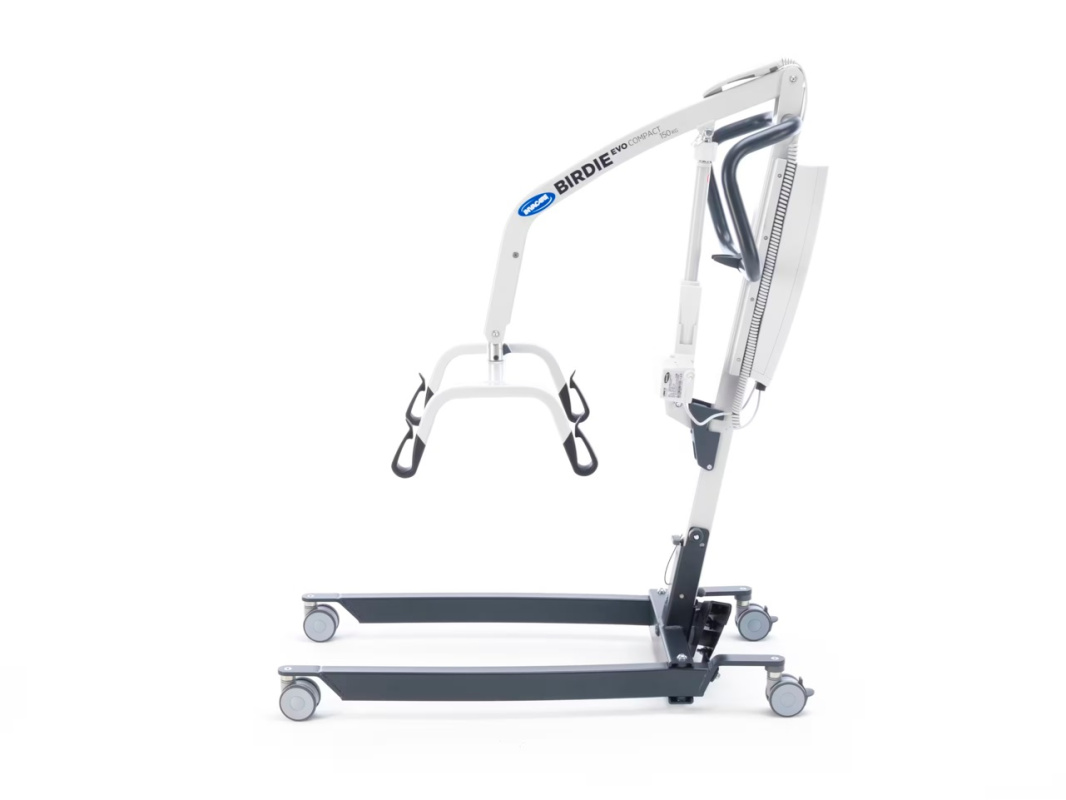
The image is for illustrative purposes only
Published:
Mobile Lift for Transferring Persons
The mobile lift can be obtained by individuals who have submitted a copy of the opinion of the State Commission of Health and Working Ability Experts regarding the need for special care and are unable to change their body position and move themselves.
Usage:
The mobile lift for transferring persons is suitable for lifting, transferring, and repositioning seated and lying patients.
The lifting mechanism operates with the help of an electric motor, controlled by a remote control. The mobile patient lift is a battery-operated transfer device designed to move and position a person from one surface to another. For example:
- Between the bed and wheelchair
- To and from the toilet
- Lowering and lifting the patient to/from the floor.
- Maximum safe working load.
Intended for indoor use on flat surfaces, in hospitals, care facilities, and domestic spaces. The mobile patient lift can be rotated in place to maneuver in limited spaces. The intended operator of this product is a healthcare professional or an individual who has received appropriate training.
Intended users:
For transferring completely or partially immobile individuals who cannot be moved manually or with other types of lifts/transfer assistive devices. All position changes are possible without the patient's assistance.
Assistive device supplier: SIA “Unihaus”
Additional information
- ID number 123603-0
- ISO code 12 36 03
- Manufacturer EU
Receiving a technical aid: step by step
-

How to apply for a technical aid
Brief explanation of the application procedure and the necessary steps.
Read more -

Required documents and their submission
A simple list of documents and instructions on how to submit them.
Read more -

Contacts
VTPC department contacts and all necessary information for communication
Contacts page
