 +371 67 552 350
 vtpc@nrc.lv


To receive a suitable technical aid, an application must be submitted. Here, step by step, it is explained how to prepare the documents, where to submit them, and how to receive the assistive device.
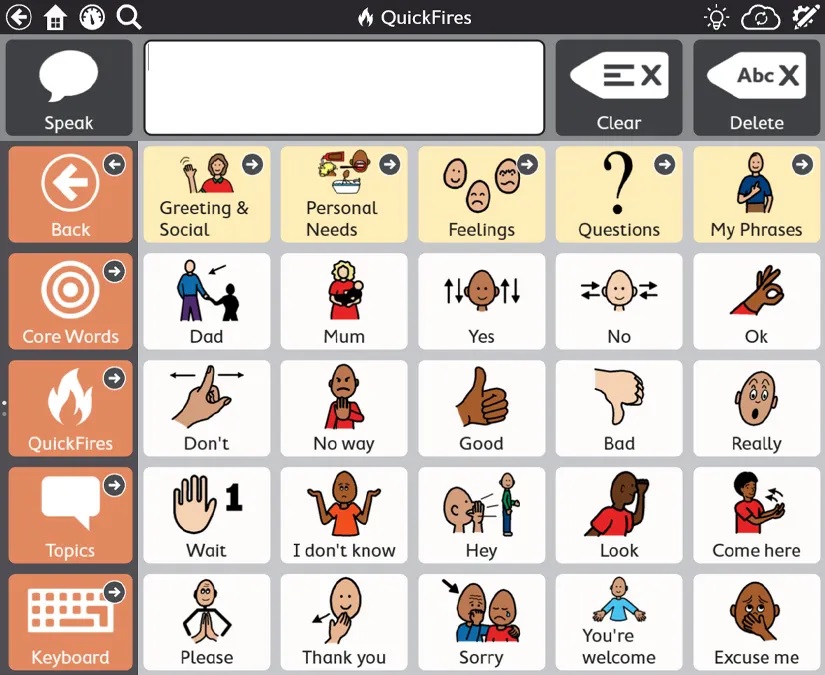
The image is for illustrative purposes only
Published:
Communication Software
Software for Communication
Purpose:
Alternative communication software suitable for individuals with speech, language, or communication impairments.
The program allows users to express wishes, needs, and communicate with others. Selected symbols are played from the device, generating speech.
The program is suitable for individuals with autism spectrum disorders, cerebral palsy, Down syndrome, intellectual disabilities, aphasia, and other impairments.
Description:
- Adjustment of the number of message boxes;
- Creation of individual spreadsheets according to the user's needs and abilities;
- Addition of personal images;
- Input options using touch, buttons, mouse, scanning, or eye gaze control;
- The software operates on a device with the Windows operating system installed.
Additional Equipment:
As needed, additional software equipment is available - Latvian language license. (A physical person who uses the Latvian language in daily communication is provided with the option to set the voice function of the software in Latvian).
Important:
A personal computer is required for receiving and using the software.
The device's software is compatible with the Windows operating system.
Additional information
- ID number 222112-0
- ISO code 22 21 12
- Manufacturer EU
Receiving a technical aid: step by step
-

How to apply for a technical aid
Brief explanation of the application procedure and the necessary steps.
Read more -

Required documents and their submission
A simple list of documents and instructions on how to submit them.
Read more -

Contacts
VTPC department contacts and all necessary information for communication
Contacts page
